Showing posts with label windows. Show all posts

16 August 2008

Linux isn't for everyone

I've wanted to write this entry for ages, but I keep forgetting. Fortunately, there's plenty of people on the Internet that helpfully remind me. There's a massive misconception about why people should adopt Linux, and I see it over and over again (because I still read Digg comments; the drama is just too enticing). Quotes like this pretty much sum up the problem:

people want an OS that works OUT OF THE BOX - they don't want to tweak with the kernel ... and no flavor of Linux is getting that done properly.

NO. "they don't want to tweak with the kernel" is 100% wrong, and that is the issue. The inevitable banal response to this is somebody saying "Ubuntu means you don't have to mess with the kernel", which is completely the wrong tack to take. The right answer is "If you want things to work out of the box and you don't like fiddling, Linux is not for you". "I just want it to work" is not the attitude of somebody that should be using Linux, that's not what it's for. Yes, it is entirely possible for things to work out of the box on Linux, and Ubuntu is very good at that, but what's the point? You might as well use Windows, you're not getting the main benefit of Linux: infinite flexibility. You can make arguments for security and reliability, but obviously Windows users (or at least the 87 that dugg up that comment anyway) don't particularly care, or have no issue with Windows in those areas.

I understand the Linux community's desire to convert people to Linux: the more people that use Linux, the more supported it has to be by hardware and software companies. But harrassing every Windows user you find and telling them they should be using Linux if they know what's good for them is nonsense. Linux is not for everyone; it really isn't for most people, since most people are fine with the default configuration of everything and don't particularly need it to change. Leave those people alone and stop getting in arguments with them; if at any point in a Windows/Linux argument the Windows person says "I just want it to work", just let it go -- they'll be happier with Windows

20 May 2008

Random Fail

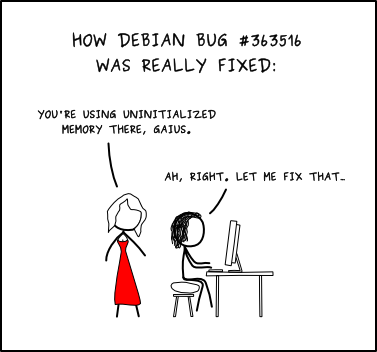
I just found a fairly amusing/depressing (depending on what OS you're using) article about how Windows sucks at generating random numbers. First, we might as well all take a moment to laugh at Debian, as has become the custom every time random number generation is mentioned:


Now that that's out of the way. It appears Windows too fails at randomness, and the test of it is actually really simple. The author of the source article wrote a short PHP script that sets each pixel of a generated image based on the results from the rand() function. Since PHP uses the system libraries for this, it's equivalent to testing the OS. I ran his script on two of my machines, one running LAMP and one WAMP. Guess which is which:


The worst part, and I'm not really clear if this is a PHP problem or Windows, is the image doesn't change under Windows. PHP is supposed to auto-seed the RNG (somehow), but on Windows the image doesn't change unless I add an explicit call to srand(). This doesn't fix the problem, but at least then I get different non-random images. I considered writing "Random Fail" over the one image, but I like the glaring wrongness by itself.

And this is one of the big differences between Windows and Linux. When the OpenSSH vulnerability came out -- and it really depresses me that it took 2 years for somebody to notice, especially with sites like GitHub noticing multiple users with the same SSH key. But anyway, when the OpenSSH vulnerability came out, I got about 6 updates over the next 24 hours, presumably 1 to fix the problem and 5 more to convince me they were sorry. I'm fairly sure this problem will never be fixed (I ran the WAMP test on Vista).

EDIT: There's a nice in-depth exploration of this on Codifies that looked through PHP's source code and determined this is actually PHP's fault, not Windows'. Nonetheless, I maintain that the above paragraph would be true if this were Windows' fault.

31 March 2008

I posted this with Ctrl+P

OK, try this. I think all browsers have a file menu; if your browser doesn't have a file menu, find one that does. Open the file menu. Done? Good job. Now, did you in any way touch the mouse? If you used the mouse to open the menu, you're doing something very wrong.

I was recently forced in class to read a thing about how wonderful the Mac menu system is. Seriously, I had to explain why Mac OS is clearly the superior operating system. For credit. I don't have the lecture material, but suffice to say Mac menus are awesome because the current window's menu is always at the top of the screen, so you can just fling your mouse to the top of the screen and easily click the menu. Now, obviously this ignores the whole still-need-to-position-horizontally problem, which I would think pretty much kills the time gain, but apparently studies say it really is faster. However, this also ignores the you're-using-completely-the-wrong-interface problem. The approximate order of increasing input device speed is:

  1. Prayer

  2. Mouse

  3. Keyboard

  4. Mind reading


The mouse has lots of useful applications, but my definition of "lots" is degrees of magnitude smaller than most people's. People used to watch me use computers in middle school and giggle that I never used the mouse, and while "never" is an overstatement it's fairly accurate compared to the rest of them. The mouse is stunningly overused, because people are too lazy to learn the keyboard ways to do stuff. You don't even have to bind your own shortcuts, just the default ways to do things will massively speed up your productivity.

If you need to run a program, Super+R opens the run dialog in Windows, Meta+F2 in GNOME. I can't remember the last time I manually opened a run dialog, and I almost never use a shortcut or a start menu item to launch a program, it takes forever. Super+D/Ctrl+Meta+D shows the desktop, although hopefully if you're doing this you're not going to need desktop shortcuts anymore so this won't come in handy very often. Here's one nobody seems to know: Super+Pause opens the System properties dialog. Never right click My Computer again. Want to open the start menu? There's a dedicated key on the keyboard for it. Stop clicking the start menu and hit the key with the pretty windows symbol on it. Then hit the first letter of the menu you want to jump to, P for programs, S for search (although Super+F will get you there faster anyway), etc. Just learning basic navigation keys for documents makes life so much easier. You don't need to be a vim ninja, just knowing that Ctrl+End will get you to the end of the document in most programs is helpful. Highlighting by holding Shift and an arrow? Hold down Control too and each arrow press will jump one word instead of one character.

Now, if you're feeling super crazy, you can set up your own hotkeys to do stuff. I don't know the canonical way to do this in Windows, but most programs come with their own way to deal with hotkeys. Under Linux I use XBindKeys, which lets you map keys to commands really easily. Here's one of my entries:

mpc toggle
Alt+Mod4 + space

When I hit Meta+Super+Space, it runs "mpc toggle", which pauses or unpauses my music. I have a bunch for MPD, a bunch of others for MPlayer (for videos), and a handful for miscellaneous other programs. For maximum fun, you can get peripherals. I have a Saitek Command Pad and a Griffin Powermate, and I use Gizmod to control both of them, which lets you write Python scripts to deal with input devices. In short: bonus hotkeys. Global hotkeying is much easier in Linux because everything is doable from the command-line, but I imagine a lot of this can be accomplished in Windows as well.

Side note: Coincidentally (I started writing this like a week ago when I had the evil lecture of mac-loving), there's an article on Coding Horror about how using the keyboard tends to take longer than using the mouse when learning a program. This is probably true, although with hints like letters underlined in menus I would think the keyboard would be able to keep up just about from the beginning. Nonetheless, once you know how to use the keyboard, it's always going to be faster, so if it's a program you use regularly it's definitely worth the effort. Google understands this, and all of their web applications have hotkeys built in, which is something incredibly lacking in web UIs for some reason. I hit Ctrl+S to save my draft of this entry, and Ctrl+P to publish it. In Google Reader (which i highly recommend), J and P jump to the next/previous entry in the list, and V opens the current selection in a new tab. There are other hotkeys, I don't remember them because I don't use them often, but just remembering two or three saves time.

22 March 2008

Start?

This is going to be short, but this particular thing drives me crazy. At some point some anti-Microsoft person noticed that to shut down your machine, you click the Start button. They apparently thought this was quite comical, and suddenly everyone on the internet is making fun of Microsoft for being so silly as to put the shutdown option in the Start menu. Now, it's possible the whole Internet is just stupid, or maybe people really do get it and then just keep making fun of Microsoft anyway because it makes them feel good, but just in case it's the former I'm going to clear it up right here. The "Start" on the Start button means start doing something. So, for example, if you want to start to shut down your computer, you would click Start -> Shut Down. You don't click the Start button to start up your computer either, but nobody seems to care about that one. No, it's not a perfect analogy, but when they added the start bar in Windows 95 it was a really big deal UI-wise (No more alt-tab switching!, wink), and it took a decade for somebody to finally complain that apparently they're too slow to figure out how to shutdown their machines.

06 March 2008

Microsoft giveth and Microsoft taketh away

Suddenly so many problems I've had with my home network are explained: XP accounts with blank passwords can't be used over the network. I hereby award Microsoft 1 point for enabling this feature that will increase your security assuming you have no firewall or router and are still stupid enough to have no password, and deduct 1000 points for all of the networking problems I've had everytime I try to access one of my family's computers that doesn't use a password. Apparently my assumption that setting the account to allow remote access meant the account allows remote access was foolish.